Author: Aman Bishnoi

  • Small Business Website Design in India: A Planning Guide

    Small Business Website Design in India: A Planning Guide

    Small business website design goes wrong most often before any designing starts. The owner pays for a site, the designer guesses what it should do, and six months later nobody can update it and it brings no enquiries. This guide covers the decisions to make first, so the website you get is one you own, can change and actually use.

    It is written for owners of local service businesses in India planning a first website or replacing an old one.

    What a small business website has to do

    A small business website has three jobs:

    • Be found: show up when people search for your service in your area, alongside your Google Business Profile.
    • Be trusted: show quickly that you are real, local and good at what you do.
    • Be contacted: make calling, messaging or visiting effortless.

    Everything else, from colours to animations, matters only if it helps one of those three jobs. Write these down before you speak to a designer; they are the test every design decision should pass.

    The pages you actually need

    Most local businesses need fewer pages than they think. A typical starting set:

    PageWhat it must do
    ——
    HomeSay what you do, where, and how to contact you, in the first screen
    ServicesOne clear section or page per main service, in the words customers use
    AboutWho is behind the business, with real photos
    ProofWork examples, reviews, before-and-after photos where relevant
    ContactPhone, WhatsApp, map, address or service area, hours
    Privacy policyRequired if you collect names or phone numbers through a form

    A well-built one-page website can cover all of these as sections. Separate pages make sense when services are very different from each other, or when you want each one to rank for its own searches. The local business website checklist goes into what each section needs.

    Choosing a platform

    For most small businesses the choice is between WordPress, a hosted website builder such as Wix, or Shopify if selling products online is the main goal. The deciding questions are simple:

    • Who will update it? If you will, choose something you can edit without calling a developer.
    • Do you need to sell online? Product catalogues, carts and payments change the answer.
    • How much control do you want over SEO and speed? Self-hosted WordPress gives the most; hosted builders trade control for convenience.

    Domain, hosting and ownership

    This is the part owners regret skipping. Before work starts, make sure:

    • The domain is registered in your name and email, not the designer’s.
    • You have the login for hosting, the domain registrar and the website admin.
    • You know when each renews and what it costs.
    • Backups exist and you know where they are.

    If a designer will not hand these over, treat that as a warning sign.

    The content you must prepare

    Designers can make a site look good, but they cannot invent your business. Prepare:

    • A list of services in plain language, with what each includes.
    • Real photos of the premises, team and work. Phone photos in good light are fine.
    • Your business name, address or service area and phone number exactly as they appear on your Google Business Profile.
    • Answers to the questions customers ask most often on the phone.
    • Two or three genuine reviews you have permission to quote.

    Speed and mobile basics

    Most people will see your site on a phone, often on mobile data. Ask for:

    • A layout designed for mobile first, then adapted for larger screens.
    • Compressed images in a modern format such as WebP.
    • A test with Google’s PageSpeed Insights before handover.

    Local SEO built in from the start

    It costs little to set up properly on day one and a lot to fix later:

    • A unique title and description for each page, naming the service and city.
    • One main heading per page.
    • Your name, address and phone in text, matching your profile.
    • LocalBusiness structured data.
    • An XML sitemap submitted in Google Search Console.

    The wider picture is in the local SEO guide for small businesses.

    How to brief a designer

    A one-page brief saves weeks of back-and-forth. Include:

    1. What the business does, for whom and where.
    2. The three jobs above, in your words.
    3. The pages or sections you need.
    4. Two or three websites you like, and what specifically you like about each.
    5. Who will update the site after launch.
    6. Your budget range and deadline.
    7. A list of what you will provide, and by when.

    Common mistakes

    • Choosing a design before deciding what the site must do.
    • Letting someone else own the domain.
    • Using stock photos instead of real ones.
    • Launching without testing on a real phone.
    • Treating launch as the end. A website needs small, regular updates.

    Frequently asked questions

    How long does a small business website take to build?

    It depends mostly on how quickly the content is ready. When services, photos and text are prepared in advance, a straightforward site moves much faster than one where content is written during the build.

    Should I start with a one-page website?

    For many single-location businesses, yes. It is quicker to launch and easier to keep fast. You can add separate service pages later.

    Do I need a website if I already have a Google Business Profile?

    The profile brings calls on its own, but a website gives people a reason to trust you and gives Google more information about what you do. They work best together.

    Want a second pair of eyes on yours?

    I’m Aman Bishnoi, founder of RankWithAman in Hisar, Haryana. I build websites and handle Local SEO and Google Business Profile work for local businesses. If you’d like a short, no-obligation review of your own setup, request a free website + SEO audit and I’ll send you a priority list of what to fix first.
  • Local Business Website: 9 Things That Turn Visitors into Enquiries

    Local Business Website: 9 Things That Turn Visitors into Enquiries

    A local business website has one job: to turn a person who found you on Google into a call, a WhatsApp message or a visit. Design matters, but only as far as it helps that happen. These are the nine things I check first. This post is part of the local SEO guide for small businesses.

    1. Say what you do and where, immediately

    Within the first screen a visitor should know what you offer, who it is for and which city or area you serve. A clever slogan with no service or place in it loses people.

    2. Make contact one tap away

    Put click-to-call and WhatsApp buttons at the top of the page and keep them visible on mobile as the visitor scrolls. Every extra step between interest and contact loses some enquiries.

    3. Design for the phone first

    Most local searches happen on mobile. Check your site on a real phone: text readable without zooming, buttons large enough to tap, no sideways scrolling, forms that are short.

    4. Keep it fast

    Slow pages lose visitors before they see anything. The usual causes are oversized images, too many plugins and heavy sliders. Google’s Core Web Vitals measure three things: how fast the main content loads (LCP), how quickly the page responds to a tap (INP) and whether the layout jumps around (CLS). Compress images, use modern formats such as WebP and remove what you do not need. Google’s PageSpeed Insights is a free way to check.

    5. Give each service its own clear section

    Describe each main service separately: what it includes, who it is for and what happens next. This helps visitors, and it gives Google a clear match for each search. The words to use come from your local keyword research.

    6. Show real proof

    Use real photos of your premises, team and work, genuine customer reviews and specific examples of what you have done. Stock photos and vague claims do the opposite of building trust.

    7. Match your Google Business Profile exactly

    Your business name, address and phone number on the website should be identical to your profile. Embed your Google Map and link to the profile. The Google Business Profile checklist covers the profile side.

    8. Help search engines read the page

    • A unique title and description for each page, naming the service and the city.
    • One main heading per page, with sub-headings in order.
    • Descriptive alt text on images.
    • LocalBusiness structured data with your name, address, phone and hours.
    • An XML sitemap submitted in Google Search Console.

    9. Answer the questions people ask before they call

    Prices or price ranges where you can, areas served, timings, how to book, what to bring. A short FAQ section saves phone calls and catches long, specific searches.

    Redesign or rebuild?

    Often a rebuild is not needed. If the site is on a sound platform, fixing speed, mobile layout, messaging and contact options can change results quickly. A rebuild makes sense when the platform itself is the limit: it cannot be edited easily, cannot be made fast or is not secure. If you are unsure which applies to you, that is exactly what a website review should tell you.

    A quick local business website self-check

    Open your site on your phone and answer honestly:

    1. Can I tell what this business does and where in five seconds?
    2. Can I call or message with one tap?
    3. Did the page load quickly on mobile data?
    4. Is there anything here that proves the business is real and good?

    Any “no” is your next job.

    Frequently asked questions

    Is a one-page website enough for a local business?

    For many single-location businesses, yes, as long as each service has a clear section and the page is fast. Separate pages become worthwhile when services are very different or you serve several locations.

    Does my website affect my Google Maps ranking?

    Yes. Google uses information from across the web, including your site, when deciding how relevant and prominent a business is.

    How often should I update my website?

    Whenever your services, prices, hours or contact details change, and add new photos, reviews or articles regularly so it stays current.

    Want a second pair of eyes on yours?

    I’m Aman Bishnoi, founder of RankWithAman in Hisar, Haryana. I build websites and handle Local SEO and Google Business Profile work for local businesses. If you’d like a short, no-obligation review of your own setup, request a free website + SEO audit and I’ll send you a priority list of what to fix first.
  • Local Keyword Research: Find What Nearby Customers Search

    Local Keyword Research: Find What Nearby Customers Search

    Local keyword research is the process of finding the exact words nearby customers type into Google when they need what you sell, then using those words in the right places. You do not need paid tools to do it well for a single-location business. This post is part of the local SEO guide for small businesses.

    What makes a keyword “local”?

    A local keyword is a search where Google shows a map and nearby businesses. Some name a place (“physiotherapist in Hisar”). Some imply it (“physiotherapist near me”, or just “physiotherapist” typed on a phone). Google treats all three as local.

    Step 1: List your services in customer language

    Write down everything you sell, then rewrite each item the way a customer would say it. Listen to the words people use on the phone and on WhatsApp. “Root canal” is searched more often than “endodontic treatment”.

    Step 2: Add location and intent modifiers

    Combine each service with:

    • Place: your city, well-known areas, nearby towns you serve.
    • Near me: “near me”, “nearby”, “open now”.
    • Quality and price: “best”, “top”, “affordable”, “price”, “charges”.

    This gives you a first list such as “car seat covers in Hisar”, “car seat cover shop near me” and “car seat cover price”.

    Step 3: Let Google expand the list

    • Autocomplete: type each phrase slowly and note what Google suggests.
    • People also ask: these questions make good blog topics and FAQ answers.
    • Related searches: the suggestions at the bottom of the results page.
    • Google Maps: search the service and look at the categories and wording used by the businesses that appear first.

    Step 4: Check your own data

    • Business Profile performance: shows the searches that already displayed your profile. These are real, local and specific to you.
    • Google Search Console: the Performance report shows the searches bringing people to your website and your average position for each.
    • Google Keyword Planner: free with a Google Ads account, and can show rough demand for a city. Treat the numbers as estimates.

    Step 5: Group keywords by intent

    • Ready to act: “near me”, “in city”, “price”, “book”, “contact”. These belong on your homepage, service sections and Business Profile.
    • Comparing: “best”, “top”, “vs”, “reviews”. These suit detailed service pages and case studies.
    • Learning: “how to”, “what is”, “why”. These suit blog posts.

    Step 6: Put each group in the right place

    • One main service keyword per page or section, used in the page title, the main heading and the first paragraph.
    • Services and description fields in your Google Business Profile.
    • Image file names and alt text, where it reads naturally.
    • Blog posts for the questions, linking back to the service they relate to.

    Use each phrase where it fits and write for the reader. Repeating a keyword many times does not help and makes the page worse. For what the page itself needs once the words are chosen, see the local business website checklist.

    A short local keyword research example

    Here is how a car accessories shop might map its list. The keywords are illustrative, chosen to show the method, not measured search volumes.

    KeywordIntentWhere it goes
    car seat covers in HisarReady to actMain service section of the website, Business Profile services
    car accessories shop near meReady to actHomepage heading and Business Profile description
    car seat cover priceReady to actA price range or “starting from” line in the service section
    best car seat cover materialComparingA comparison article linking to the service section
    how to clean leather seat coversLearningA short blog post linking to the service section

    Five keywords, five different jobs, and no two pages competing for the same search.

    Frequently asked questions

    Do I need paid keyword tools?

    Not for a single-location business. Autocomplete, your Business Profile data and Search Console cover most of what you need.

    How many keywords should one page target?

    One main keyword and a handful of close variations. If two keywords need different answers, they need different pages.

    Should I make a separate page for every area I serve?

    Only if you can say something specific and useful about each one. Near-identical pages with the area name swapped add little and can hurt.

    Once you have your list, the first place to use it is your profile: see the Google Business Profile optimization checklist.

    Want a second pair of eyes on yours?

    I’m Aman Bishnoi, founder of RankWithAman in Hisar, Haryana. I build websites and handle Local SEO and Google Business Profile work for local businesses. If you’d like a short, no-obligation review of your own setup, request a free website + SEO audit and I’ll send you a priority list of what to fix first.
  • How to Get More Google Reviews Without Breaking the Rules

    How to Get More Google Reviews Without Breaking the Rules

    If you are wondering how to get more Google reviews, the reliable way is to ask every satisfied customer, at the right moment, with a direct link that takes them straight to the review box. It sounds too simple, but most businesses with few reviews are not short of happy customers. They are just not asking. This post is part of the local SEO guide for small businesses.

    Why reviews matter

    Reviews do two jobs. They are one of the signals Google uses to judge how prominent a business is, and they are often the last thing a customer reads before choosing between you and the next result. Recent reviews matter more to readers than old ones, so a steady flow beats a one-time push.

    How to get more Google reviews in five steps

    Step 1: Get your review link

    In your Google Business Profile, choose “Ask for reviews” (sometimes shown as “Get more reviews”). Google gives you a short link and a QR code. Save both.

    Step 2: Ask at the right moment

    Ask when the customer has just received the value: after a successful appointment, on delivery, when a job is finished and they have said they are happy. Asking a week later gets far fewer responses.

    Step 3: Make it one tap

    • Send the link on WhatsApp straight after the visit, with a short personal message.
    • Print the QR code on the counter, on the bill or on a small card.
    • Add the link to your email signature and your thank-you messages.

    Three messages you can adapt. Keep them short, personal and free of any reward.

    • English, after a visit: “Thank you for visiting us today. If you have a minute, an honest Google review would really help our small business: [link]”
    • Hindi, after a visit: “आज हमारे यहाँ आने के लिए धन्यवाद। अगर आपके पास एक मिनट हो, तो Google पर आपका ईमानदार रिव्यू हमारे छोटे व्यवसाय की बहुत मदद करेगा: [link]”
    • One gentle reminder, two or three days later: “Hope everything is going well with [product/service]. If you get a moment, here is the review link again: [link]. Thank you either way.”

    Send the reminder once at most. Repeated chasing annoys customers and can feel like pressure.

    Step 4: Make asking a habit

    Decide who asks and when, so it happens for every customer and not only when someone remembers. Five requests a day, every day, will change a profile within a few months.

    Step 5: Reply to every review

    Thank people by name and mention what they came for. Replies show future customers that someone is paying attention.

    What Google does not allow

    • Paying for reviews: no discounts, gifts or cashback in exchange for a review.
    • Review gating: asking only happy customers and steering unhappy ones elsewhere.
    • Fake reviews: reviews from staff, family, yourself or bought accounts.
    • Review stations that pressure customers: asking people to write a review in front of you on your own device.

    Google’s own tips for getting more reviews say the same, and the rules themselves are in the Maps user-contributed content policy. Breaking these rules can lead to reviews being removed, or to restrictions on the profile. It is not worth it.

    How to handle a negative review

    • Reply calmly and briefly. Do not argue in public.
    • Acknowledge the issue, say what you have done or will do, and offer a direct contact.
    • If the review is fake or abusive, report it from your profile. Google removes reviews that break its policies, not ones that are merely negative.

    A few negative reviews with thoughtful replies often make a profile more believable, not less.

    Frequently asked questions

    How many Google reviews do I need?

    There is no fixed number. Look at the businesses that appear for your main searches and aim to match them over time, with a steady flow of new reviews.

    Can I ask customers to mention my service in the review?

    You can ask them to describe what they came for and how it went. Do not write the review for them or tell them what words to use.

    Can I delete a bad review?

    No. Only Google can remove a review, and only if it breaks policy. Your reply is the part you control.

    To make sure the profile those reviews sit on is complete, work through the Google Business Profile optimization checklist.

    Want a second pair of eyes on yours?

    I’m Aman Bishnoi, founder of RankWithAman in Hisar, Haryana. I build websites and handle Local SEO and Google Business Profile work for local businesses. If you’d like a short, no-obligation review of your own setup, request a free website + SEO audit and I’ll send you a priority list of what to fix first.
  • Google Business Profile Optimization: A 12-Point Checklist

    Google Business Profile Optimization: A 12-Point Checklist

    Google Business Profile optimization means filling in your profile completely and accurately, then keeping it active, so Google can match it to the right local searches. This is the checklist I work through on a new profile, in order. It is one part of the wider local SEO guide for small businesses.

    Before you start

    You need to be the verified owner or manager of the profile. If the business already appears on Google Maps, claim that listing instead of creating a second one. Duplicate profiles split your reviews and can lead to suspension.

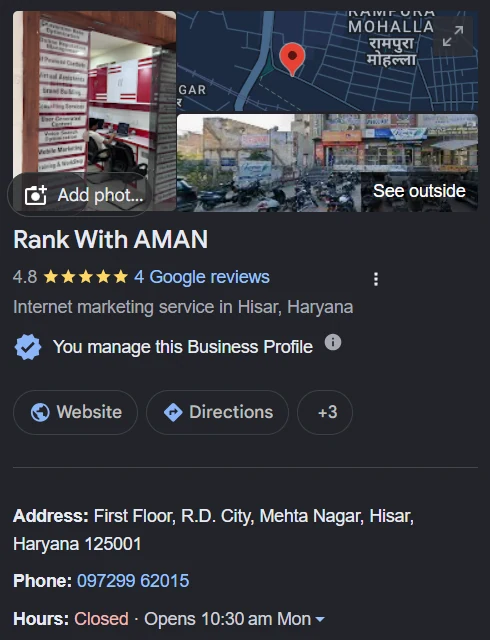
    The RankWithAman Google Business Profile on Google Search, showing category, rating, address, phone and opening hours
    An example: the RankWithAman profile on Google Search. The category, address, phone number and hours match the website exactly.

    The 12-point Google Business Profile optimization checklist

    1. Use your real business name

    The name must match your signboard and paperwork. Do not add services or city names to it. Keyword-stuffed names break Google’s guidelines for representing your business and are a common reason for suspensions.

    2. Pick the most specific primary category

    The primary category has more influence on which searches you appear for than any other field. Choose the narrowest accurate option. “Car accessories store” is better than “Store” if that is what you are.

    3. Add secondary categories that are truly relevant

    Add categories for the other things you really do. Leave out anything you would have to stretch to justify.

    4. Set the address or service area correctly

    If customers come to you, show the address and place the map pin precisely. If you travel to customers and do not serve them at your address, hide the address and set a service area instead.

    5. Keep hours accurate, including holidays

    Wrong hours cause wasted visits and bad reviews. Add special hours for festivals and holidays.

    6. Add a phone number and website link you control

    Use a number that is answered. Link to the most relevant page of your website, and consider adding a tracking tag to the link so you can see profile visits in your analytics.

    7. List your services or products

    Add each service with a short, plain description of what it includes. This is where you can naturally use the words customers search for.

    8. Write a clear business description

    You have up to 750 characters. Say what you do, who for and where, in the first two sentences. Skip slogans and offers.

    9. Upload real photos, regularly

    Add the outside of the premises, the inside, the team and examples of your work. Real photos help customers recognise the place and show the profile is active. Avoid stock images.

    10. Publish posts

    Posts appear on your profile and are a simple way to show current offers, new work or updates. A steady rhythm, such as one a week, is easier to maintain than a burst.

    11. Ask for reviews and reply to all of them

    Share your review link with satisfied customers and reply to every review. Never offer rewards for reviews. The guide on asking customers for Google reviews has message templates and the rules to follow.

    12. Check the Performance report monthly

    Look at calls, direction requests, website clicks and the search terms that showed your profile. Use those terms to improve your services list and your website.

    What not to do

    • Do not create profiles for locations where you have no real presence.
    • Do not use a virtual office or a friend’s address.
    • Do not copy a competitor’s name or category setup without checking it fits your business.
    • Do not ignore emails from Google about profile changes; edits suggested by the public can go live.

    How often should you update it?

    Posts and photos: weekly or fortnightly. Reviews: reply within a few days. Hours, services and description: whenever something changes, and a full check once a quarter.

    Frequently asked questions

    Is a Google Business Profile free?

    Yes. Creating, verifying and managing a profile costs nothing.

    How long does verification take?

    It varies. Video verification is often reviewed within a few days, but it can take longer.

    Why was my profile suspended?

    The most common causes are a keyword-stuffed name, an address that does not qualify, or duplicate profiles. Fix the cause first, then submit an appeal with evidence such as a signboard photo and a utility bill.

    Want a second pair of eyes on yours?

    I’m Aman Bishnoi, founder of RankWithAman in Hisar, Haryana. I build websites and handle Local SEO and Google Business Profile work for local businesses. If you’d like a short, no-obligation review of your own setup, request a free website + SEO audit and I’ll send you a priority list of what to fix first.
  • Local SEO for Small Businesses in India: A Practical Guide

    Local SEO for Small Businesses in India: A Practical Guide

    Local SEO for small business owners comes down to one thing: making the business easier to find when someone nearby searches for what it sells. For most small businesses in India that means two places: the map results on Google (the “local pack” and Google Maps) and the normal website results below them. This guide explains how those results are decided and what to work on first.

    What is local SEO?

    Local SEO is search optimisation for searches with local intent, such as “dentist near me”, “car seat covers in Hisar” or “best coaching institute Hisar”. Google answers these with a map and a short list of businesses, then ordinary web pages. Local SEO covers everything that influences both: your Google Business Profile, your website, your reviews and how consistently your business details appear across the web.

    It is different from general SEO in one important way. A national website competes on content and links alone. A local business also competes on where it is and how well Google understands what it does at that location.

    How Google ranks local results

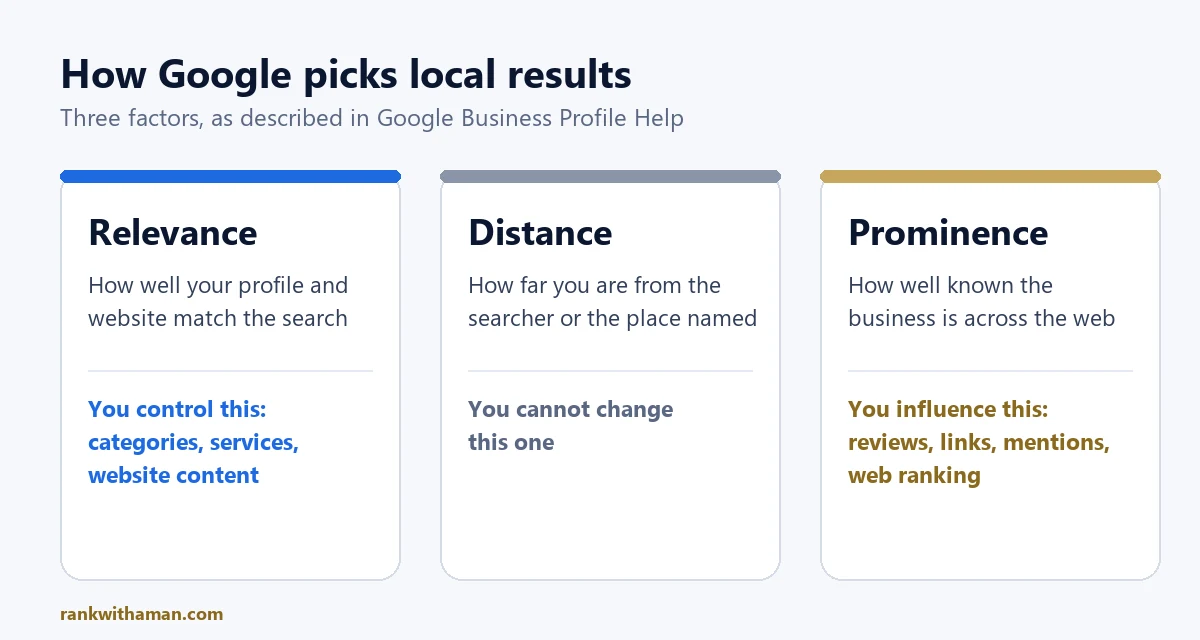
    Google’s own guide to improving your local ranking says local results are based mainly on three things:

    • Relevance: how well your profile and website match what the person searched for.
    • Distance: how far your business is from the searcher, or from the place named in the search.
    • Prominence: how well known the business is, which Google estimates from reviews, links, mentions and its normal web ranking.
    Diagram of the three local ranking factors Google describes: relevance, distance and prominence, and which ones a business can influence
    The three local ranking factors, summarised from Google Business Profile Help.

    You cannot change distance. So practical local SEO is about relevance (clear, complete, accurate information) and prominence (reviews, a useful website and real mentions elsewhere). Nobody can guarantee a position in Maps, and anyone who promises one is guessing.

    1. Set up and complete your Google Business Profile

    For a local business, the Google Business Profile is usually the single most valuable asset. It is free and it is what appears on Maps and in the local pack.

    • Claim and verify the profile. Verification is often done by a short video of your premises and signage.
    • Use your real business name exactly as it appears on your signboard. Adding keywords to the name breaks Google’s guidelines and can get a profile suspended.
    • Choose the most specific primary category you can, then add relevant secondary categories.
    • Add services or products with short descriptions, accurate opening hours, phone number and website.
    • Upload real photos of the premises, team and work, and keep adding new ones.

    The full step-by-step list is in the Google Business Profile optimization checklist.

    2. Find the keywords local customers actually use

    People search differently from how business owners describe themselves. A shop may call itself an “automotive accessories showroom” while customers type “car seat cover shop near me”.

    • Start with your services and add the city or area: “service + city”, “service near me”, “best service in city”.
    • Type them into Google and note the autocomplete suggestions and the “People also ask” questions.
    • Check the Performance section of your Business Profile to see the searches that already show your business.
    • Group the terms by intent: people ready to visit or call, and people still comparing or learning.

    Each important service should have a clear home on your website. Blog posts can then answer the questions people ask before they are ready to buy. The full method, with free tools, is in the guide to local keyword research.

    3. Make your website support your profile

    Your profile gets you seen. Your website is where many people decide whether to call. It also gives Google more evidence about what you do and where. The local business website checklist goes through each point below in more detail.

    • Put your business name, address or service area, and phone number in text on the site, matching your profile exactly.
    • Give each main service its own section or page, with a title that says the service and the city.
    • Make it fast and easy to use on a phone. Most local searches happen on mobile.
    • Add click-to-call and WhatsApp buttons that are visible without scrolling.
    • Add LocalBusiness structured data so search engines can read your details reliably.
    • Embed your Google Map and link to your profile.

    4. Earn reviews, and reply to them

    Reviews affect both ranking and whether someone chooses you. A steady flow of recent, genuine reviews is worth more than a burst of them in one week. Here is a step-by-step process for how to get more Google reviews without breaking Google’s rules.

    • Ask every satisfied customer, at the moment they are happiest, and send them your direct review link.
    • Never offer discounts or gifts for reviews and never ask only the happy customers while filtering out the rest. Both are against Google’s review policies.
    • Reply to every review, including the negative ones, calmly and specifically.

    5. Keep your business details consistent everywhere

    Your name, address and phone number (often shortened to NAP) should be the same on your website, your Google profile and every directory listing. Inconsistent details make it harder for Google to be confident about your business.

    For most Indian small businesses it is enough to have accurate listings on a handful of well-known platforms: Justdial, IndiaMART or Sulekha where relevant, Bing Places, Apple Business Connect and your Facebook and Instagram pages. A few accurate listings are better than hundreds of low-quality ones.

    6. Track what is working

    • Business Profile performance: calls, direction requests, website clicks and the searches that showed your profile.
    • Google Search Console: which searches bring people to your website and which pages they land on.
    • Enquiries: ask new customers how they found you, and write it down.

    Review these once a month. Local SEO moves in weeks and months, not days. Profile fixes can show within a few weeks; competitive rankings usually take several months of consistent work.

    Common mistakes in local SEO for small business

    • Stuffing keywords or city names into the business name.
    • Choosing a broad primary category when a specific one exists.
    • Creating a profile and never updating it again.
    • Using a different phone number on the website and the profile.
    • Buying reviews or bulk directory listings.
    • Having a website that looks fine on a laptop and is hard to use on a phone.

    Frequently asked questions

    How long does local SEO take to work?

    Corrections to a profile can have an effect within a few weeks. Ranking for competitive searches in a busy category usually takes a few months of steady work on the profile, reviews and website.

    Do I need a website if I have a Google Business Profile?

    A profile can bring calls on its own, but a website gives Google more information about your services and gives customers a reason to trust you. The two work best together.

    Is local SEO free?

    The Google Business Profile and Search Console are free. The cost is the time to do the work properly and keep doing it, or the fee of someone who does it for you.

    Can anyone guarantee the top spot on Google Maps?

    No. Results depend on the searcher’s location, the competition and Google’s own systems. What can be promised is the work: a complete profile, a better website and a clear record of what was done.

    Want a second pair of eyes on yours?

    I’m Aman Bishnoi, founder of RankWithAman in Hisar, Haryana. I build websites and handle Local SEO and Google Business Profile work for local businesses. If you’d like a short, no-obligation review of your own setup, request a free website + SEO audit and I’ll send you a priority list of what to fix first.
    More in this local SEO for small business guide