Google Business Profile optimization means filling in your profile completely and accurately, then keeping it active, so Google can match it to the right local searches. This is the checklist I work through on a new profile, in order. It is one part of the wider local SEO guide for small businesses.
Before you start
You need to be the verified owner or manager of the profile. If the business already appears on Google Maps, claim that listing instead of creating a second one. Duplicate profiles split your reviews and can lead to suspension.
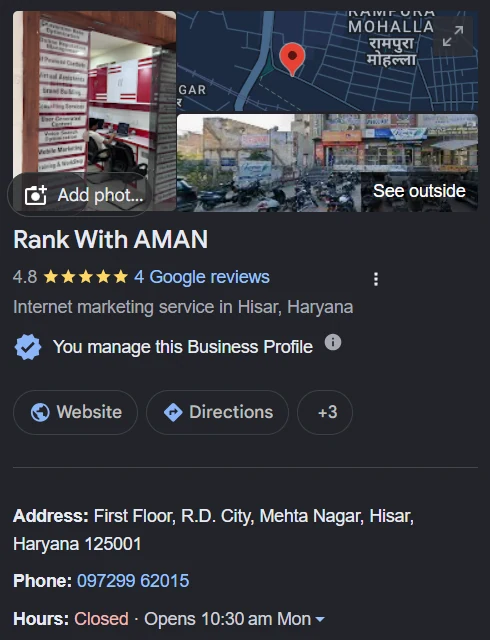
The 12-point Google Business Profile optimization checklist
1. Use your real business name
The name must match your signboard and paperwork. Do not add services or city names to it. Keyword-stuffed names break Google’s guidelines for representing your business and are a common reason for suspensions.
2. Pick the most specific primary category
The primary category has more influence on which searches you appear for than any other field. Choose the narrowest accurate option. “Car accessories store” is better than “Store” if that is what you are.
3. Add secondary categories that are truly relevant
Add categories for the other things you really do. Leave out anything you would have to stretch to justify.
4. Set the address or service area correctly
If customers come to you, show the address and place the map pin precisely. If you travel to customers and do not serve them at your address, hide the address and set a service area instead.
5. Keep hours accurate, including holidays
Wrong hours cause wasted visits and bad reviews. Add special hours for festivals and holidays.
6. Add a phone number and website link you control
Use a number that is answered. Link to the most relevant page of your website, and consider adding a tracking tag to the link so you can see profile visits in your analytics.
7. List your services or products
Add each service with a short, plain description of what it includes. This is where you can naturally use the words customers search for.
8. Write a clear business description
You have up to 750 characters. Say what you do, who for and where, in the first two sentences. Skip slogans and offers.
9. Upload real photos, regularly
Add the outside of the premises, the inside, the team and examples of your work. Real photos help customers recognise the place and show the profile is active. Avoid stock images.
10. Publish posts
Posts appear on your profile and are a simple way to show current offers, new work or updates. A steady rhythm, such as one a week, is easier to maintain than a burst.
11. Ask for reviews and reply to all of them
Share your review link with satisfied customers and reply to every review. Never offer rewards for reviews. The guide on asking customers for Google reviews has message templates and the rules to follow.
12. Check the Performance report monthly
Look at calls, direction requests, website clicks and the search terms that showed your profile. Use those terms to improve your services list and your website.
What not to do
- Do not create profiles for locations where you have no real presence.
- Do not use a virtual office or a friend’s address.
- Do not copy a competitor’s name or category setup without checking it fits your business.
- Do not ignore emails from Google about profile changes; edits suggested by the public can go live.
How often should you update it?
Posts and photos: weekly or fortnightly. Reviews: reply within a few days. Hours, services and description: whenever something changes, and a full check once a quarter.
Frequently asked questions
Is a Google Business Profile free?
Yes. Creating, verifying and managing a profile costs nothing.
How long does verification take?
It varies. Video verification is often reviewed within a few days, but it can take longer.
Why was my profile suspended?
The most common causes are a keyword-stuffed name, an address that does not qualify, or duplicate profiles. Fix the cause first, then submit an appeal with evidence such as a signboard photo and a utility bill.
Want a second pair of eyes on yours?
I’m Aman Bishnoi, founder of RankWithAman in Hisar, Haryana. I build websites and handle Local SEO and Google Business Profile work for local businesses. If you’d like a short, no-obligation review of your own setup, request a free website + SEO audit and I’ll send you a priority list of what to fix first.
Leave a Reply